

Bihar Online Land Mutation (Dakhil-Kharij) 2025: Updated Step-by-Step Application Guide
In 2025, the online Dakhil-Kharij application option on the official Bihar land portal was fully updated. A new interface has been launched, and several new service options have been added. If you want to apply for land mutation online in Bihar, this guide will walk you through the entire process, step by step, in simple, easy-to-understand language.
Step 1 — Visit the Official Portal

Open the official Bihar land website.
On the main page, you will find the first link titled:
➡ “Apply for Online Dakhil-Kharij (Mutation)”
Click on this link.
Step 2 — Login or Register

After clicking, you will see a Login option under Online Services.
If you are already registered:
Select Citizen → Login and sign in using your 10-digit mobile number and captcha.If you are a new user:
Click on “Registration” and fill in:Personal details
Full address
Captcha code
Then click “Register Now.”
You will receive an OTP on your mobile. Enter it and verify your account.
Step 3 — Sign In with OTP

Return to the login page, enter:
10-digit mobile number
Captcha
Click “Sign In”
A new OTP will be sent. Enter it and click “Confirm.”
You will now reach the Online Mutation / Dakhil-Kharij Dashboard
Step 4 — Select Mutation Service

Choose the first option again:
✅ “Apply for Online Dakhil-Kharij (Mutation).”
Your profile details will already be visible on the screen.
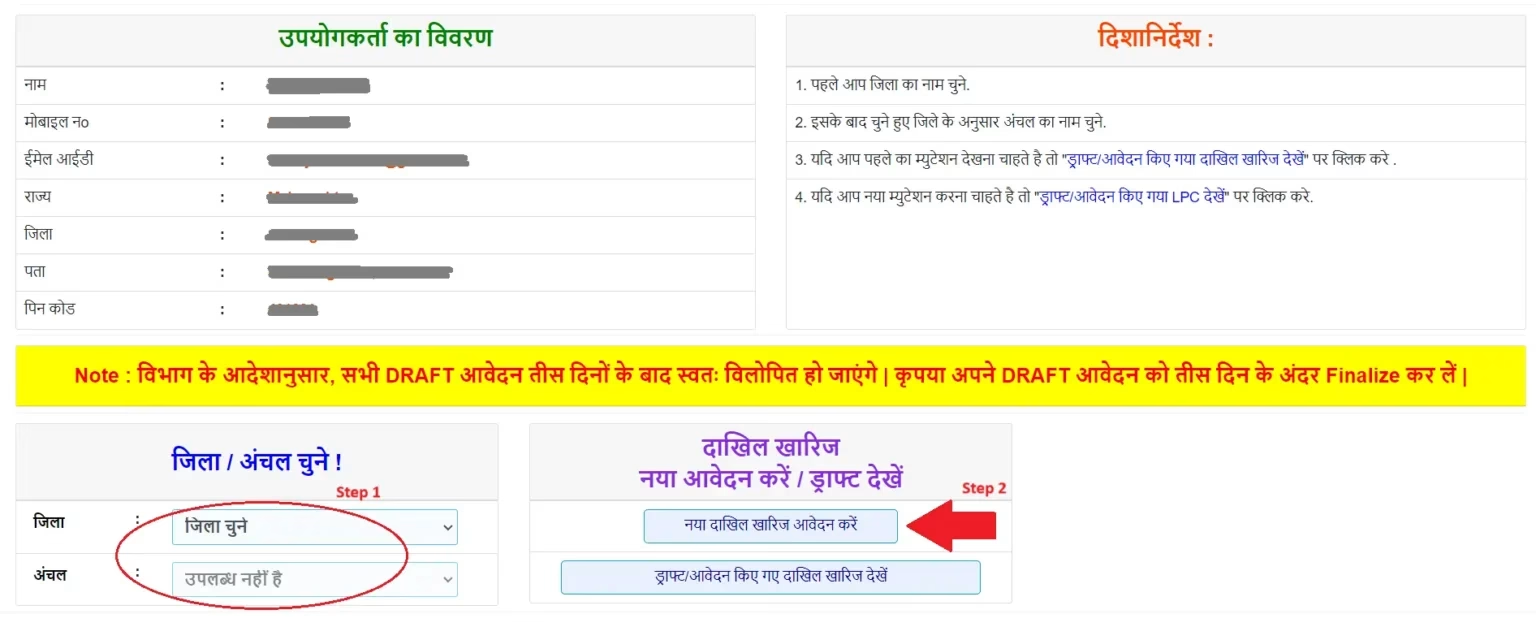
Step 5 — Choose District, Circle, and Zone
Scroll down and select:
District — Your home district in Bihar
(Page will refresh)Anchal / Circle (Revenue Block)
Thana / Mauza (Village / Police Zone)
Step 6 — New Mutation or Resume Draft
Two options appear:
New Mutation Application
Resume Saved Draft
If you are applying for the first time, select:
🆕 “Apply for New Dakhil-Kharij (Mutation)”
Step 7 — Select Applicant Type
Click “Choose Applicant Type”
You will see multiple options:
| Applicant Type | Meaning |
|---|---|
| Self Buyer (Krata) | Applying for your own land |
| Service Provider | Applying on behalf of someone else |
| Third Party Assistant | Middleman / Authorized person |
If you are helping someone else, select:

✅ “Applicant is a Service Provider”
Then enter:
Applicant’s full name
Father or Husband’s name
Relationship → Select Father / Husband
Step 8 — Choose Mutation Reason
Click on “Select Mutation Type”
Here are the major options:
Sales / Purchase
Gift
Exchange
Inheritance
Other Transfer Types
If the land was bought or sold, select:
✔ “Sales/Purchase Mutation.”
Step 9 — Address Same Checkbox
If permanent and temporary addresses are the same:
☑ Tick “Same as Permanent Address.”
Then click:
📌 “Save & Next”
Plot / Land Details Section

Step 10 — Enter Plot Information
You will now enter the plot details, including:
Halka number
Mauza / Village
Jamabandi number
Khasra / Plot number
Area in acres and decimals (Dismil)
Boundary details (North/South/East/West land owner names)
Important Seller Ownership Check
You must answer:
❓ “Is the seller the Jamabandi holder?”
Yes → Enter plot details directly
No → System will ask:
Is the land jointly owned?
Are there multiple shareholders?
Is this a combined land account?
If no, and the land belonged only to the seller’s father (alive), you will need a Consent Letter (Sahmati Patra) from the real Jamabandi holder.
If you have already attached it, select Yes.
If land is single-owned — select No, then proceed.
After entering plot data, click:
🔍 “Search Land Record” → Select the record and click “Select.”
Confirm the Plot
Answer:
✅ “Is mutation applied for this land?” → Yes
Then Save & Next, click OK, then Close Window
Your plot data will now be visible in the summary list.
Buyer & Seller Details Section
Step 11 — Add Buyer Details
Select:
👤 “Raiyat (Individual Buyer).”
Enter:
Name
Guardian name
Relationship
Gender
Mobile number
Full address
Aadhaar number
If there are multiple buyers, click “Add New Row” and enter the second buyer’s details.
Then:
📌 Save & Next
Step 12 — Add Seller Details
Enter the same type of details for the person who sold the land, including caste if applicable (optional but present in form).
📌 Click Save & Next
Document Upload Section
Step 13 — Upload Registered Deed (Sale Document)
Enter:
Deed number
Registration date
SRO/DSRO office name
Upload document (PDF, up to 1MB)
If 90+ days have passed, you must enter a delay reason
Step 14 — Upload Other Documents
For Aadhaar:
Document name → Aadhaar Card
Issue date → As printed on Aadhaar
Authority → UIDAI
Upload Aadhaar PDF
Click Save & Next
Step 15 — Verify Buyer Mobile via OTP
Click:
📲 “Verify Buyer Mobile” → Get OTP
Enter OTP and Confirm.
Step 16 — Preview & Final Submit
Click:
👀 “Preview & Submit”
Check all details carefully → Tick final declaration and click:
📌 “Final Submit.”
✅ Application Completed
This is the latest and officially updated method for 2025, allowing you to apply for Bihar land mutation from home using mobile or computer.


%202025:%20Updated%20Step-by-Step%20Application%20Guide)